


What Is Memory CL? Is Lower Always Better? A Complete Guide to CAS Latency
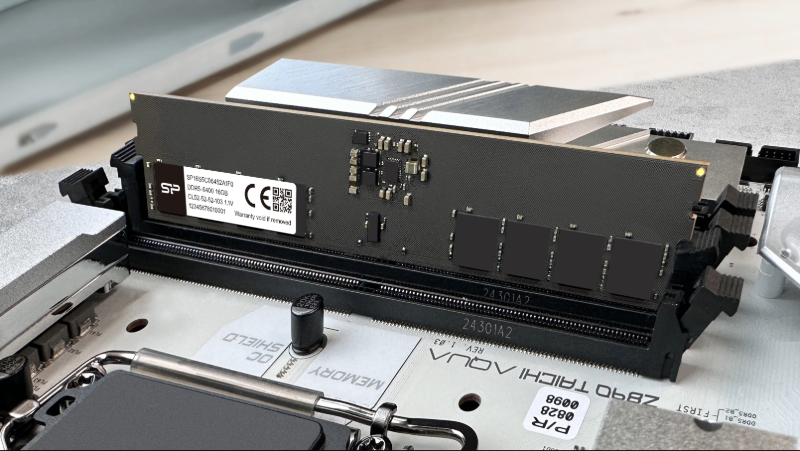
The CL value of memory is commonly used to determine its response time.
When shopping for memory, frequency usually gets all the attention, but there is another spec worth understanding. That string of numbers like "40-52-52-134" buried in the product details represents memory timings. The first number is the CL value, also known as CAS Latency, which measures how quickly memory responds after receiving a read command.Most buyers assume lower is always better, but CL value alone does not tell the whole story. Frequency plays an equally important role, and the two need to be considered together to understand actual performance.This guide explains how to read CL values, decode full timing specifications, and choose the right memory for your specific needs.
Menu
-What Is Memory CL (CAS Latency)?
-How Does CL Relate to Memory Frequency?
-How to Calculate Actual Memory Latency
-Is a Lower CL Value Always Better?
What Is Memory CL (CAS Latency)?
__26C11488Qc.jpg "CAS Latency")
Memory specifications typically include two key metrics: frequency (Speed) and timings.
When browsing memory specs, you've probably noticed two types of numbers: a frequency like 8400MT/s and a string of numbers like 40-52-52-134. Most people focus on frequency and ignore that second string — but it holds critical performance information.
Those four numbers represent memory timings, and the very first one is the CL value, short for CAS Latency (Column Address Strobe Latency).
The CL value measures how many clock cycles the memory needs to wait between receiving a read command from the CPU and actually returning the requested data. Think of it as the memory's response time. For example, the SP XPOWER Cyclone DDR5 running at 8400MT/s carries a CL of 40 — meaning every read operation involves a 40-cycle wait.
The lower the CL value, the shorter the wait. But here's where most buyers go wrong: clock cycles are not a fixed unit of time. To understand true latency, you need to factor in frequency.
How Does CL Relate to Memory Frequency?
Frequency (measured in MT/s, or megatransfers per second) determines how long each clock cycle actually lasts. A higher frequency means shorter individual cycles — so the same CL number translates to a shorter real-world wait time at higher frequencies.
This is why comparing CL values across different frequency tiers is misleading. A DDR5 kit at CL40 on a high-frequency module can actually be faster in practice than a CL30 kit running at a lower frequency. The only fair comparison is in nanoseconds (ns).
How to Calculate Actual Memory Latency
Use this formula to convert CL and frequency into a real latency value: Latency (ns) = (CL ÷ Speed in MT/s) × 2000
Scenario 1: Same Frequency, Different CL
|
Spec |
Calculation |
Actual Latency |
|
DDR5 6400MT/s CL30 |
(30 ÷ 6400) × 2000 |
≈ 9.38 ns |
|
DDR5 6400MT/s CL38 |
(38 ÷ 6400) × 2000 |
≈ 11.88 ns |
Takeaway: At the same frequency, the lower CL wins — CL30 is ~2.5ns faster.
Scenario 2: Same CL, Different Frequency
|
Spec |
Calculation |
Actual Latency |
|
DDR5 6400MT/s CL38 |
(38 ÷ 6400) × 2000 |
≈ 11.88 ns |
|
DDR5 6800MT/s CL38 |
(38 ÷ 6800) × 2000 |
≈ 11.18 ns |
Takeaway: At the same CL, higher frequency wins — the 6800MT/s kit is faster despite identical timings.
Is a Lower CL Value Always Better?
No — and this is one of the most common misconceptions in memory shopping.
A lower CL value only guarantees lower latency when frequency is held constant. The moment frequencies differ, you must calculate actual nanosecond latency to make a fair comparison. A CL40 kit at 8400MT/s, for instance, delivers approximately 9.52 ns — competitive with or faster than many lower-CL kits at slower speeds.
The bottom line: always calculate latency in nanoseconds before comparing memory kits across different frequency tiers.
How to Read Full Memory Timings
Memory timings are expressed as four numbers, such as 40-52-52-134. Each represents a different wait time within the memory access cycle:
|
Parameter |
Full Name |
What It Measures |
|
CL |
CAS Latency |
Cycles between a read command and the first data output |
|
tRCD |
Row to Column Delay |
Cycles between activating a memory row and accessing its columns |
|
tRP |
Row Precharge Time |
Cycles needed to close one row and prepare the next |
|
tRAS |
Row Active Time |
Minimum cycles a row must stay active to ensure complete read/write |
While CL gets the most attention, all four timings work together to determine overall memory responsiveness. Enthusiast-grade memory kits are optimized across all four values, not just CL.
How to Choose the Right CL for Your Needs
Rather than chasing the lowest possible CL, match your memory specs to your actual use case:
Everyday Office & General Use
Standard DDR5 in the 5600–6400MT/s range with mainstream CL values is more than sufficient. The real-world difference between CL30 and CL38 at this tier is negligible for browsing, documents, and light multitasking.
Gaming
Prioritize higher frequencies paired with reasonably low CL values. In latency-sensitive titles, faster memory can improve frame pacing and reduce stutters — look for kits that balance both metrics rather than maximizing either in isolation.
Overclocking & Performance Tuning
This is where the nanosecond math matters most. Enthusiasts typically seek kits that achieve a strong frequency-to-CL ratio — for example, high MT/s speeds with aggressively tuned sub-timings — to minimize actual latency while maximizing bandwidth.
FAQ
• • •