


No Computer Upgrade Needed: External SSDs for Music Production Eliminate Lag in 2026
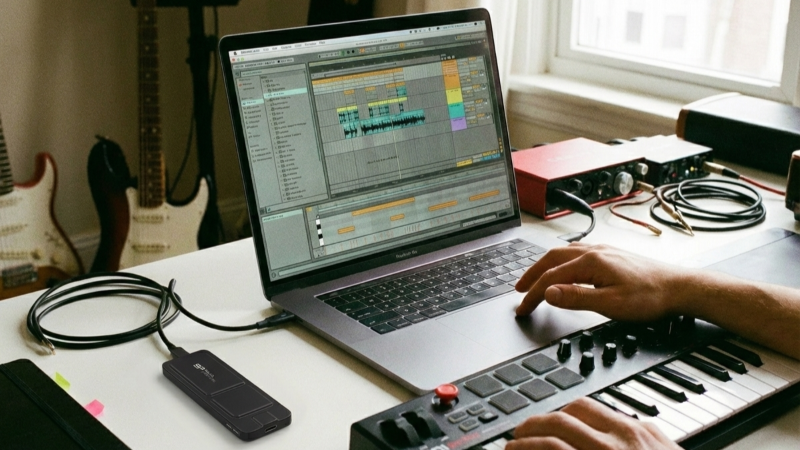
For many musicians, beyond creating music, one of the biggest headaches is organizing large amounts of music data.
Product Line: External Solid-State Drives
Application Scenario: Music Production/Arranging
Music creation today is fast, but inspiration can disappear in a moment. If your system slows down, it can easily break your creative flow. Many producers find that internal drives struggle with large sample libraries, multi-track projects, and real-time playback. An external SSD offers a practical solution by delivering faster performance and more flexible storage, helping you stay focused and turn ideas into finished music without interruption.This article will help you easily understand how external SSDs enhance music production workflow efficiency. We'll also break down the key specifications for selecting a dedicated music production drive, ensuring every burst of inspiration is fully realized in your musical creations!
Skip the Expensive Computer Upgrade: External SSDs Are the Smart Solution
Creating music today is easier than ever, but inspiration is fleeting—any system lag can break your creative flow. Running out of storage space? Before spending thousands on a new computer or costly internal drive upgrades, consider this: an external SSD solves your storage and performance problems at a fraction of the cost.
If you're working with Digital Audio Workstations (DAWs) like Logic Pro, Pro Tools, or Studio One, your internal hard drive may struggle with massive sample libraries, multi-track recordings, and real-time editing demands. Instead of upgrading your entire computer system, external SSDs offer a cost-effective alternative that delivers professional performance without the hefty price tag.
This guide explains why external solid-state drives are the smart choice for music producers who want maximum storage and speed without computer upgrades, and what specifications matter most when choosing one.
Top Benefits of External SSDs for Music Production
Free Up Your Computer's Internal Storage
Modern DAWs are sophisticated software platforms that can turn your laptop into a complete production studio. However, music assets such as samples, sound effects, and arrangement kits can quickly consume dozens of gigabytes. When everything is stored on your internal drive, it often leads to:
- Storage capacity issues
- Degraded system performance
- Sluggish DAW operation
- Longer boot and load times
Faster Load Times for Samples and Plugins
External SSDs provide stable, high-speed read/write performance that eliminates waiting time when loading audio assets during production. With transfer speeds exceeding 1,000 MB/s, you can:
- Import sample sounds instantly
- Load effect plugins without delay
- Preview materials in real-time
- Keep your creative workflow smooth
Cost-Effective Alternative to Internal Upgrades
Compared to upgrading your computer's internal storage, purchasing a high-capacity external SSD offers greater flexibility and better value. You get expandable storage without the technical complexity or expense of hardware upgrades.
Ultimate Portability for Mobile Music Production
Music production is no longer confined to the studio. With an external SSD, you can:
- Create anywhere with just your laptop
- Preserve inspiration instantly during travel
- Continue projects seamlessly between locations
- Work professionally on tour or remote sessions
Even renowned artists like Ed Sheeran have mentioned writing and producing songs during tours—external SSDs make this workflow possible.
How to Choose the Best External SSD for Music Production
Music production shares similarities with video editing: both require constant material access and real-time previews. Here are the key specifications to consider:
Storage Capacity
Minimum recommendation: 256GB to avoid feeling restricted during use. For professional producers with extensive sample libraries, consider 512GB to 2TB options.
Transfer Speed
Look for external SSDs with transfer speeds of 1,000 MB/s or higher. This significantly reduces:
- Material loading wait times
- Sample sound import delays
- Plugin initialization periods
- Software loading loops
Interface Type
Choose USB 3.2 Gen 2 or Thunderbolt 3/4 to fully utilize SSD speed advantages. Older USB 2.0 connections will bottleneck even the fastest drives.
Form Factor and Portability
Compact, lightweight designs are essential for:
- Easy transport to studios
- Mobile creation sessions
- Tour and travel scenarios
- Desktop organization
Durability and Reliability
Since music projects represent hours of creative work, choose drives with:
- Solid build quality
- Shock resistance
- Reliable performance over time
- Good warranty coverage
Real-World Performance: What to Expect
When your external SSD achieves transfer speeds exceeding 1,000 MB/s, you'll notice:
- Faster DAW project loading
- Smoother real-time playback of multiple tracks
- Reduced latency when accessing large sample libraries
- Improved overall system responsiveness
For example, drives like the SP PX10 offer read/write speeds up to 1,050 MB/s in a compact, portable package—ideal for producers who spend long hours arranging or creating on the move.
Best Practices for Using External SSDs in Music Production
Organize Your Audio Assets
- Store sample libraries on the external SSD
- Keep active project files on the SSD
- Archive completed projects periodically
- Use clear folder structures for quick access
Optimize Your DAW Settings
- Point your DAW to the external SSD for sample libraries
- Set scratch disks to the external drive
- Configure auto-save to the SSD location
- Adjust buffer settings for optimal performance
Maintain Your Drive
- Safely eject before disconnecting
- Keep firmware updated
- Monitor available space
- Create regular backups
Conclusion: Upgrade Your Music Production Workflow
External SSDs are no longer optional for serious music producers—they're essential tools that eliminate storage bottlenecks, reduce lag, and enable truly mobile production workflows. By choosing an external SSD with sufficient capacity (256GB+), fast transfer speeds (1,000 MB/s+), and modern connectivity (USB 3.2 Gen 2), you'll ensure every burst of inspiration translates into polished musical creations.
Ready to eliminate lag from your music production workflow? Invest in a quality external SSD and experience the difference in your creative process.
• • •