


What is NAS? How to Choose Hard Drives? Essential Info for Newbies All in One Place!
A NAS allows you to fully manage your data, becoming your personal dedicated storage server.
There are many ways to back up data, such as external hard drives, USB flash drives, and cloud storage. When handling large amounts of data, you may have heard of NAS. While it might sound unfamiliar, NAS combines the convenience of cloud sharing with the high capacity of hard drives, acting as a dedicated storage server for your home while improving data security. If you are new to NAS, you might wonder how it differs from regular cloud storage and how to choose the right NAS hard drives. This article will guide you through the basics of NAS, making it easy to understand.
What is NAS?
NAS, or Network Attached Storage, is a data storage device connected to your network that can hold multiple hard drives and function like a personal mini-server. By connecting the NAS to your home Ethernet or Wi-Fi, you can back up and upload data instantly. Many modern NAS devices also support dedicated management apps, allowing you to access and manage your files anytime, whether at home, on the go, or in the office.
How is NAS different from cloud storage?
While both store data over a network, the key difference is control. Cloud storage services like Google Drive, iCloud, or Dropbox store files on external servers, which may pose data leak risks. NAS lets you set access permissions or encrypt data, keeping full control over security. Cloud storage often requires ongoing subscription fees, whereas NAS involves a one-time purchase, making it more cost-effective for large data volumes.
NAS also offers faster uploads for large files since it uses your internal network rather than the internet, which can be slower for cloud services. Most NAS systems support RAID disk arrays, combining multiple drives into a single large storage space. This setup distributes data across drives to provide redundancy, improving storage security and stability.
How to Use NAS: 4 Common Applications
Most home NAS units have 2 to 4 drive bays, while enterprise models can feature 8 or more. NAS offers high-capacity storage, but what practical uses maximize its value? Here are four common applications.
1. Personal PC Backup
Computers have limited storage, typically 512GB to 1TB, which can quickly fill up with work files, photos, videos, and system data. NAS allows automatic backup of your entire computer using tools like Windows File History or macOS Time Machine. This ensures that important files and system settings are safe even if your computer fails.
2. Personal Game Library
For gamers and streamers, game files can take up significant space. Storing games like Steam titles on a NAS lets you restore them over the local network when upgrading hardware, saving time and avoiding repeated downloads. NAS provides a convenient solution for managing large game libraries.
3. Media Library
Photos and videos often accumulate over the years, and computers are frequently replaced, requiring constant data migration. NAS enables centralized storage, letting all family members access, manage, and share files. Small studios and content creators can also use NAS to organize and search work files efficiently using vendor-provided apps.
4. Surveillance System Storage
NAS can centralize video footage from multiple smart cameras in your home. By connecting cameras and NAS to the same local network, you can store and manage recordings easily, providing long-term storage without clutter. For businesses, NAS simplifies the deployment and management of corporate surveillance systems. Home users benefit from both file backup and security monitoring.
How to Choose a Hard Drive For Your NAS
NAS storage depends on hard drives, so it is important to select drives specifically designed for NAS use. Both traditional HDDs and SSDs are available, but NAS-optimized models are engineered for 24/7 operation and offer enhanced reliability with features such as Total Bytes Written (TBW) and Mean Time Between Failures (MTBF). When buying, ensure the drives are on the NAS vendor’s Qualified Vendor List (QVL) to guarantee compatibility and stable performance.
HDDs are generally more affordable, while SSDs provide faster read/write speeds and are better suited for NAS setups with heavy data access and prolonged operation. Here are three recommended NAS-optimized SSD models, all QVL-certified for reliable use.
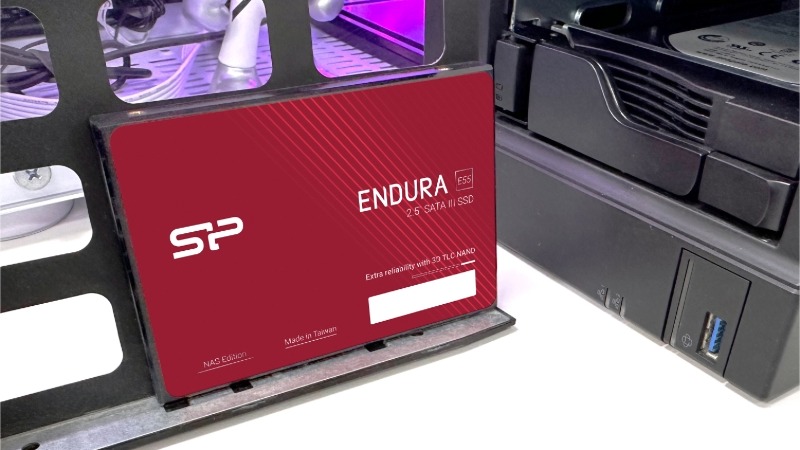
Endura NAS E55 SSD
The Endura NAS E55 features TLC 3D NAND and a SATA III 6Gb/s interface, with an MTBF of 1.5 million hours and a write endurance of 2100TBW. It reaches read speeds up to 500MB/s and write speeds up to 450MB/s, over 15 times faster than traditional HDDs. ECC and other data protection technologies ensure secure storage. This drive is ideal for personal or home backups, including photos, videos, and documents.
Endura NAS E60 SSD
The Endura NAS E60 uses a PCIe Gen 3x4 interface, achieving read speeds of 2,200MB/s and write speeds of 1,600MB/s. With a 2,100TBW endurance rating and a 2 million-hour MTBF, it includes static and dynamic wear-leveling to maximize lifespan. It is suitable for small studios or personal video and design work requiring frequent access to large files.
Endura NAS ED90 SSD
The Endura NAS ED90 supports PCIe Gen 4x4 and NVMe 1.4, delivering sequential read speeds up to 5,000MB/s and write speeds up to 4,800MB/s. It features ECC and dynamic wear-leveling to extend drive life, making it ideal for high-performance storage tasks, such as database management or other critical applications.
• • •