


UDIMM vs SODIMM vs RDIMM: Which RAM Do You Actually Need?
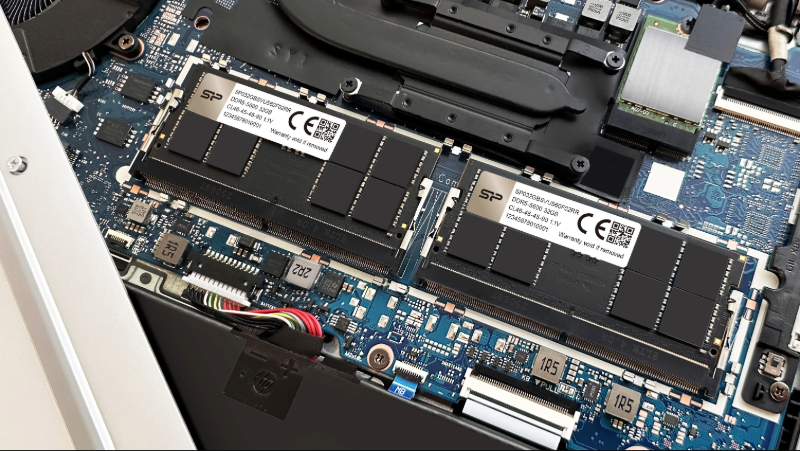
Laptop memory modules are typically smaller in size than those used in desktop computers.
If you've ever shopped for RAM and wondered what UDIMM, SODIMM, and RDIMM actually mean — you're not alone. These terms look similar, but they describe fundamentally different types of memory modules built for different devices. Pick the wrong one and it simply won't fit. This guide breaks down exactly what each type is, how they differ, and which one is right for your situation.
Menu
-What Is UDIMM: The Standard for Desktop PCs
-What Is SODIMM: Built for Laptops and Compact Devices
-What Is RDIMM: The Server-Grade Standard
What Is a DIMM?
DIMM stands for Dual In-line Memory Module, the physical RAM stick you install into a motherboard. It's a small circuit board lined with memory chips that allow the CPU to read and write data at high speed.
Think of it this way: if the CPU is the brain and RAM is short-term memory, the DIMM is the container holding that memory. Not enough RAM and your computer slows to a crawl, which is why upgrading memory is one of the most direct ways to improve performance.
DIMM is a broad category. Within it, modules are designed differently depending on the target device, giving us three main types: UDIMM, SODIMM, and RDIMM.
What Is UDIMM: The Standard for Desktop PCs
UDIMM stands for Unbuffered DIMM and is the most common RAM type on the market. Nearly every consumer desktop uses it."Unbuffered" means there is no intermediate component between the CPU and the DRAM chips. The processor talks directly to the memory, resulting in lower latency and faster response
times.
UDIMMs are also the most affordable option, making them the default choice for mainstream consumers.The trade-off is scalability. Without a buffer, signal integrity can degrade when many large modules are installed simultaneously, which is why UDIMMs are not used in servers.
What Is SODIMM: Built for Laptops and Compact Devices
SODIMM stands for Small Outline Dual In-line Memory Module. It is a compact version of the UDIMM, engineered to fit inside the tight interior of laptops, mini PCs, and small-form-factor systems.
A DDR4 SODIMM is roughly half the length of a standard UDIMM at approximately 68 mm, and uses 260 pins instead of 288. The smaller size also brings lower power consumption, which benefits battery life.
Performance-wise, SODIMMs are available at the same DDR4 and DDR5 speeds as desktop modules. In practice, the thermal and power constraints of a laptop mean real-world performance tends to be slightly lower. Expandability is also limited. Most laptops offer only one or two slots, and many modern thin-and-light models have RAM soldered directly to the board with no upgrade path.
What Is RDIMM: The Server-Grade Standard
RDIMM stands for Registered DIMM and is purpose-built for servers and enterprise systems where stability and data integrity come before everything else.
The defining feature is the register, a hardware component between the CPU memory controller and the DRAM chips. In a server loaded with many high-capacity modules, electrical load on the memory bus is very high. The register refreshes and stabilizes signals before they reach the memory, preventing errors and crashes under sustained load.
Nearly all RDIMMs also include ECC (Error Correction Code), which automatically detects and corrects single-bit memory errors in real time. This protects against silent data corruption in databases, virtual machines, and financial systems.
The trade-off is latency. Because data passes through the register first, RDIMMs are slightly slower than UDIMMs. For server workloads, stability matters far more than raw speed.
UDIMM vs SODIMM vs RDIMM:Quick Comparison
|
UDIMM |
SODIMM |
RDIMM |
|
|
Primary use |
Desktop PCs |
Laptops / Mini PCs |
Servers / Enterprise |
|
DDR4 pins |
288 |
260 |
288 |
|
Length |
~133 mm |
~68 mm |
~133 mm |
|
Signal buffer |
None |
None |
Register |
|
ECC support |
Optional |
Rare |
Standard |
|
Latency |
Lowest |
Low |
Higher |
|
Cost |
Low |
Moderate |
Higher |
How to Choose Between UDIMM, SODIMM, and RDIMM
After understanding the different types of memory, the next step is choosing the right one. The most important factor is device compatibility. Simply put, use whatever your motherboard supports. Check your motherboard's official website or your laptop's spec sheet to confirm the supported memory type and generation (such as DDR4 or DDR5) before making a decision.
From there, choose based on your use case.
Everyday use (browsing, office work, streaming)
16 GB is sufficient for most users. UDIMM for desktops and SODIMM for laptops offer a good balance of performance and cost.
Gamers and creators (editing, design, multitasking)
Aim for at least 32 GB. UDIMM and SODIMM remain the correct choices for desktops and laptops, but prioritize higher-speed kits with tighter timings for demanding workloads.
Servers and enterprise environments
Stability and data integrity matter more than speed. RDIMM with ECC is the industry standard, keeping systems running reliably under continuous heavy load.
• • •